Users & admin
Reset a user's password and recovery email
Set or generate a password for a user, how it applies to mail apps and vizsu sign-in, and when a recovery email is required.
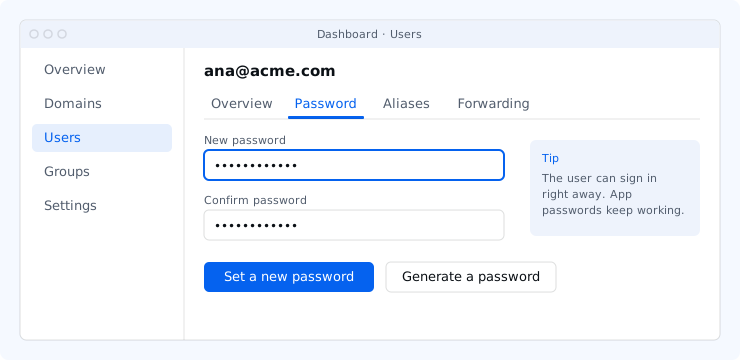
Set or generate a password
- Open Users and the user, then the Password tab.
- Choose Set a new password (type and confirm it) or Generate a password (shown once).
- You may be asked to confirm it's you.
The result shows what changed:
- One password: if the user's vizsu account was created by Mail, the new password becomes both their mailbox password and their vizsu sign-in password.
- If the person created their vizsu account themselves, or they are an owner or admin, their vizsu password is not changed; they reset it in their vizsu account.
The old password stops working immediately and email apps using it ask for the new one. Apps on app passwords keep working.
Recovery email
- Set it on the user's Overview tab. Changing it requires confirming it's you, and the user is notified.
- It is optional for regular users.
- Owners and admins must have one: you can't make someone an owner or admin until their mailbox has a recovery email.