Security & deliverability
DMARC reports
See who sends mail as your domain, how much of it passes DMARC, which sources fail, and when to tighten your DMARC policy.
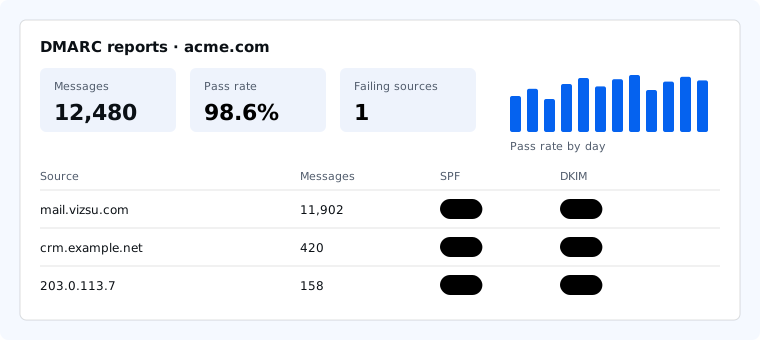
Mail servers that receive mail from your domain (Gmail, Outlook, Yahoo and others) send a daily DMARC aggregate report to the address in your DMARC record. Mail by vizsu collects these reports and turns them into a dashboard for each domain.
Send your reports to us
Open your domain in Domains, then View DMARC reports. The page shows the DMARC record to publish at _dmarc.yourdomain. It keeps your own postmaster@ address and adds ours to rua, for example:
v=DMARC1; p=none; rua=mailto:postmaster@acme.com,mailto:dmarc-reports@vizsu.comIf you already have a DMARC record, keep your policy (p=) and add our address to the existing rua= list, separated by a comma. Only one DMARC record may exist per domain.
Reading the dashboard
- Pass rate: the share of messages that passed DMARC, meaning SPF or DKIM passed and matched (aligned with) your domain.
- Pass rate by day: green is 98% or more, amber 90 to 98%, red below 90%.
- Failing sources: servers that sent mail as your domain and failed. A legitimate service here (a newsletter tool, a billing system) needs to be added to SPF or set up to sign with DKIM for your domain. Unknown servers are usually spoofing, which is what DMARC is for.
- Top sources: the servers sending the most mail as your domain, with how much passed SPF and DKIM alignment.
Tightening your policy
The dashboard suggests when to move on. Once nearly all of your mail passes with p=none, change the record to p=quarantine so receivers put spoofed mail in spam. After a few weeks with no legitimate failures, move to p=reject. See SPF, DKIM, DMARC and MTA-STS explained.