Security & deliverability
SPF, DKIM, DMARC and MTA-STS explained
What SPF, DKIM, DMARC, MTA-STS and TLS reporting do, and how Mail by vizsu sets them up for your domain.
Receiving servers check these records to decide whether mail claiming to be from your domain is genuine. Your domain page shows the values and status of each; see Add and verify your domain.
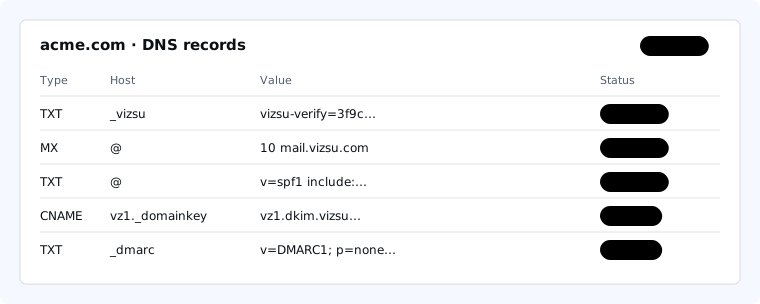
| Record | What it does | Needed |
|---|---|---|
| SPF | Lists the servers allowed to send for your domain. Ours is included with include:_spf.vizsu.com. | Required |
| Bounce handling (CNAME vizsu.yourdomain → bounce.vizsu.com) | Bounce handling: required so recipients don't see "via amazonses.com". | Required |
| DKIM | Adds a cryptographic signature to every message you send, so receivers can check it wasn't changed and came from your domain. We manage and rotate the keys via two CNAMEs. | Required |
| DMARC | Tells receivers what to do when SPF/DKIM checks fail (none, quarantine, reject) and where to send reports. | Recommended |
| MTA-STS | Tells other servers to only deliver to you over verified TLS. We host your policy at mta-sts.yourdomain. | Recommended |
| TLS-RPT | Asks senders to report TLS delivery problems. | Recommended |
Getting to a strict DMARC policy
- Start with
p=noneand make sure SPF and DKIM show OK. - Make sure every other service sending as your domain (newsletters, billing) is in SPF or signs with DKIM.
- Then move to
p=quarantine, and laterp=reject.