Email apps
Troubleshoot email apps
Fix authentication failed, cannot send, certificate warnings and sync problems in email apps connected to Mail by vizsu.
Authentication failed or password rejected
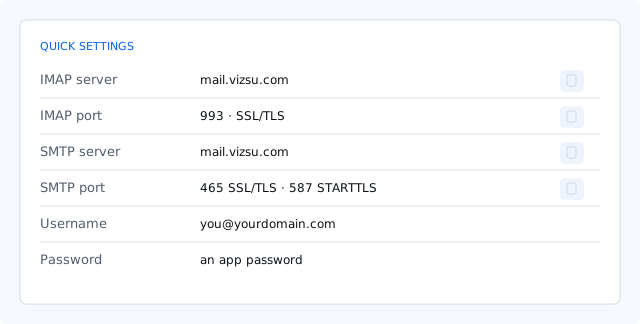
- Use your full email address as the username.
- Use an app password. Your vizsu account password is not accepted by IMAP or SMTP.
- Check the app password wasn't revoked. If unsure, create a new one and paste it (don't retype).
- If you use Mail app protection with the mailbox password, the server also needs your authenticator code; switching the app to an app password is simpler.
- Ask your admin whether your mailbox is active.
Can receive but can't send
- The outgoing (SMTP) server must have authentication on, with the same username and app password.
- Port 465 uses SSL/TLS from the start; port 587 uses STARTTLS. Mixing them up fails. Some networks block 465: try 587.
- Sending may be limited during the warm-up period, by your daily limit, or paused after unusual activity. Webmail and the bounce message say which.
- You can only send from your own address or addresses you were given (aliases, send-as).
Certificate warnings
- Use
mail.vizsu.comas the server name. Other names, likemail.yourdomain.comor an IP address, don't match the certificate. - Check your device's date and time are correct.
- Never accept a certificate warning permanently on an untrusted network.
Mail not syncing
- Make sure the account is IMAP, not POP.
- Check the app's sync period and which folders it syncs; some apps sync only recent mail or only the inbox.
- Remove and re-add the account if folders look stale after renaming them in webmail.
- If the mailbox is full, new mail is refused. See Storage.