Email apps
Use Gmail with your vizsu address
Send as your vizsu address from Gmail on the web, and why Gmail's "Check mail from other accounts" does not work.
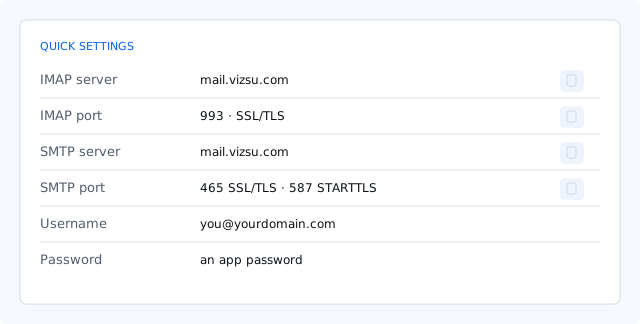
Send as your vizsu address from Gmail on the web
- Create an app password for Gmail.
- In Gmail open Settings → See all settings → Accounts and Import → Send mail as → Add another email address.
- Enter your name and vizsu address, then Next.
- SMTP server
mail.vizsu.com, port 465 with SSL (or 587 with TLS), username your full address, password the app password. - Gmail sends a confirmation code to your vizsu address. Open it in webmail and enter the code in Gmail.
Receiving vizsu mail in Gmail
Gmail's Check mail from other accounts fetches mail over POP, which Mail by vizsu does not offer, so it won't work. Instead:
- On a phone, add your vizsu address to the Gmail app as an IMAP account: Gmail app on Android.
- Or ask your admin to set up forwarding to your Gmail address (counts toward sending limits).