Domains & DNS
Add and verify your domain
Every DNS record Mail by vizsu uses (ownership TXT, MX, SPF, DKIM, DMARC, MTA-STS, TLS-RPT, autoconfig) and what the statuses mean.
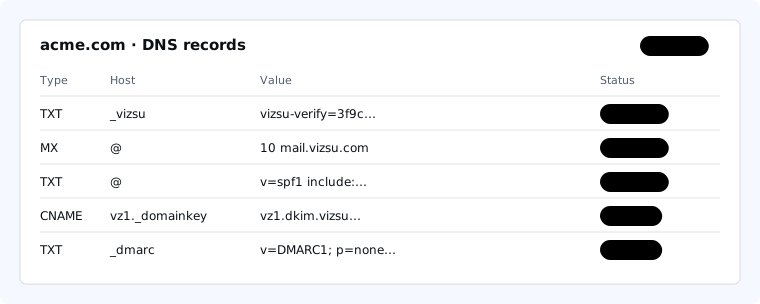
Your domain page in Domains shows the exact values for your domain, with copy buttons. The Host column is written the way most DNS providers expect it: @ means the domain itself, and other names are relative to your domain (enter _vizsu, not _vizsu.acme.com).
Steps
- Open Domains and add your domain.
- Add the ownership TXT record at your DNS provider. The domain becomes verified once it is visible.
- Add MX, SPF and DKIM (required), then the recommended records.
- Reopen the domain page; each record shows its live status.
Required records
| Purpose | Type | Host | Value |
|---|---|---|---|
| Ownership | TXT | _vizsu | Your verification token (shown on the domain page). |
| Incoming mail | MX | @ | mail.vizsu.com, priority 10. |
| SPF | TXT | @ | v=spf1 include:_spf.vizsu.com -all |
| DKIM | CNAME | v1._domainkey, v2._domainkey | Targets shown on the domain page. |
| Bounce handling | CNAME | vizsu | bounce.vizsu.com |
DKIM. New domains get two CNAMEs pointing at keys we manage: one signs your mail; the other is a spare so keys can rotate without DNS changes. Add both. Some older domains show a DKIM TXT record instead; copy it exactly.
SPF. A domain can have only one SPF record. If you already have one, add include:_spf.vizsu.com to it rather than adding a second. Records that still use the older include:amazonses.com keep working; we recommend switching.
Bounce handling. Bounce handling: required so recipients don't see "via amazonses.com". Add one CNAME, vizsu pointing to bounce.vizsu.com; it doesn't affect your SPF record on @. Until they are in place your mail is still delivered, but Gmail shows "via amazonses.com" next to your name.
Recommended records
| Purpose | Type | Host | Value |
|---|---|---|---|
| DMARC | TXT | _dmarc | v=DMARC1; p=none; rua=mailto:postmaster@yourdomain |
| MTA-STS | TXT | _mta-sts | v=STSv1; id=… |
| MTA-STS policy host | CNAME | mta-sts | The target shown on your domain page. |
| TLS reporting | TXT | _smtp._tls | v=TLSRPTv1; rua=mailto:tls-rpt@vizsu.com |
| Email app setup | CNAME | autoconfig | autoconfig.vizsu.com |
| Email app setup | CNAME | autodiscover | autodiscover.vizsu.com |
If you already have a DMARC record, keep it; any valid v=DMARC1 record counts. What each record does: SPF, DKIM, DMARC and MTA-STS explained.
Record statuses
| Status | Meaning |
|---|---|
| OK | We found the record with the expected value. |
| Missing | Nothing is published at that name yet, or it has not propagated. |
| Mismatch | Something is published but the value differs. A missing character, extra quotes or a doubled domain name are the usual causes. |
| Unknown | The DNS lookup failed or timed out. Try again in a minute. |
A domain is ready when it is verified and every required record is OK. Recommended records don't block readiness.
Troubleshooting
Most providers publish changes within minutes, but caches can hold old answers for the record's TTL (often up to an hour, occasionally 48 hours). If a record still shows Missing after an hour, re-check the host name. A pending domain that is never verified may eventually be claimed by someone who can prove ownership; verified domains are never released.