Email apps
SMTP settings for apps, devices and scripts
Send mail through mail.vizsu.com from mail apps, printers, scanners and scripts: ports 465 and 587, authentication and limits.
Send mail through Mail by vizsu from an email app, a printer or scanner (scan-to-email), or a script.
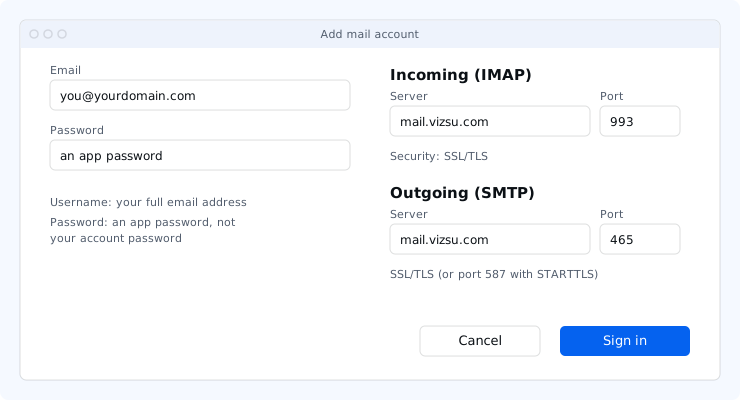
| Setting | Value |
|---|---|
| Server | mail.vizsu.com |
| Port and security | 465 SSL/TLS (implicit), or 587 STARTTLS |
| Authentication | Required. Username: full email address. Password: an app password. |
| From address | Your mailbox address, or an address you are allowed to send as (aliases, delegated or shared mailboxes) |
Authentication is only offered after the connection is encrypted. Unencrypted sending and anonymous relay are not supported.
Printers and scanners
- Create an app password named after the device.
- In the device's email or SMTP settings enter the server, port 465 with SSL/TLS (or 587 with STARTTLS/TLS), and turn on SMTP authentication.
- Use your full address as the username and sender, and the app password.
- Send a test scan.
Devices that only support unencrypted SMTP or port 25 without sign-in can't send through Mail by vizsu.
Scripts
Most languages have an SMTP library. Connect with TLS on port 465 (or STARTTLS on 587), log in with the address and an app password, then send. For applications, the HTTP API may be a better fit.
Limits
SMTP mail counts toward the same sending limits and warm-up as webmail. A single message can have at most 50 recipients, and message size is limited by your plan.
Troubleshooting
- Authentication failed: the username must be your full address and the password an app password. Create a new one if unsure.
- Can't send: make sure the outgoing server requires sign-in with the same username and password. If port 465 is blocked on your network, use 587 with STARTTLS.
- More fixes: Troubleshoot email apps.