Security & deliverability
Spam and virus filtering
How incoming mail is checked for spam and viruses, which attachments are refused, and how to handle Junk.
Incoming mail
- Spam filtering: every message is scored by the mail server's spam filter, including checks against public blocklists. Likely spam goes to Junk.
- Virus scanning: messages are scanned for malware before delivery.
- Dangerous attachments are refused: mail with risky file types (for example
.exe,.js,.isoor macro-enabled Office files like.docm) is rejected rather than delivered to Junk. Send such files as a shared link instead.
What you can do
- Use Report spam on a message in webmail to move it to Junk.
- In Junk, use Not spam to move a message back to the inbox. On your own mailbox the sender is also added to your allowed senders, so their mail stops going to Junk.
- Block senders in Settings → Privacy & images (see Filters and blocked senders).
Organisation allowed and blocked senders
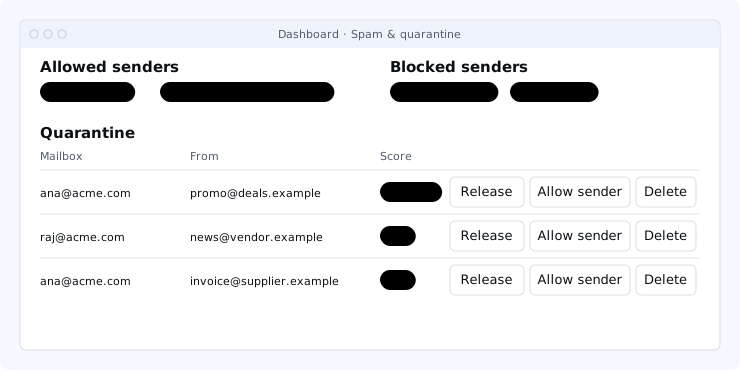
Owners and admins can set lists for every mailbox in the organisation under Settings → Spam & quarantine in the dashboard.
- Allowed senders (an address like
name@partner.comor a whole domain like@partner.com): mail the spam filter would put in Junk goes to the inbox instead. Virus scanning and the attachment rules still apply. - Blocked senders (an address, a
@domainor the sending server's IP address): mail goes straight to Junk, before anyone's personal rules, forwarding or auto-reply. - IP addresses can only be blocked, not allowed, because a sender can fake the headers an IP allow would rely on.
- Blocking wins: a blocked sender stays blocked even if someone allowed them personally.
- Changes apply to all mailboxes within a minute. If the mail server is busy the page shows Not applied everywhere and retries automatically every few minutes.
Quarantine
The quarantine on the same page lists messages in the Junk folder of every mailbox in your organisation, newest first, with the sender, subject, date and spam score. Messages from a blocked sender are marked Blocked.
- Release moves the message to that mailbox's inbox.
- Allow sender releases it and adds the sender to the organisation's allowed senders.
- Delete removes it permanently.
Each action is recorded in the audit log. Messages refused outright (for example dangerous attachments) were never accepted, so they are not in the quarantine. Junk is emptied on the mailbox's normal schedule.
Outgoing mail
The same dangerous attachment types are refused when you send. See Delivery, sending limits and warm-up for limits and pauses.